POS System Tablet: The Complete Technical Buyer's Guide
Evaluate and deploy a POS system tablet with confidence. Covers hardware specs, security, integrations, TCO, and implementation for technical buyers.


Most advice about a POS system tablet starts with the wrong question. It asks which screen is cheapest, lightest, or easiest to carry, then acts surprised when the deployment breaks under real service pressure. In production, the tablet itself is usually the least important part of the stack. The failures come from offline recovery, peripheral congestion, OS support gaps, and the ugly reality of managing dozens of devices across stores, lanes, and dining rooms.
The market is growing because the model works operationally, not because a touchscreen is fashionable. Market.us estimates the tablet POS systems market at USD 8.5 billion in 2024, rising to USD 9.7 billion in 2025 and reaching about USD 30 billion by 2034, which implies a 13.4% CAGR over the forecast period, with North America holding more than 35.7% of revenue in 2024 and card reader type dominating at 64.6% share Market.us. DataIntelo also places the broader tablet POS market at USD 8.2 billion in 2025 and projects USD 16.8 billion by 2033 at a 9.4% CAGR, with cloud-based deployment at 62.3% share in 2025 DataIntelo. That growth tells you where buying decisions are going, toward mobility, cloud coordination, and lighter rollout friction, but it doesn't change the operational truth. A tablet POS survives only when the hardware, software, and support model hold together under pressure.
Table of Contents
Why Most Tablet POS Deployments Fail Before Year Two - The hidden breakpoints in the field - Why the tablet is only one node in the system
Hardware Requirements That Actually Matter in Production - Compute matters less than consistency - I/O density is the hidden differentiator
Choosing Between Android iPad and Windows POS Platforms - Android gives flexibility, but demands discipline - iPad and Windows solve different control problems
Integrating Payments Inventory and Analytics Back Ends - Payments need fewer handoffs, not more - Inventory and analytics need clean data contracts - Watch the integration surface area
Calculating True Total Cost of Ownership - The obvious costs are the easiest to underestimate - Add supportability to the model
Implementation Roadmap From Pilot to Fleet Deployment - Phase 1 validate the device, not the demo - Phase 2 prove the integration stack - Phase 3 roll out in waves - Phase 4 manage the fleet like infrastructure
Building the Engineering Team to Execute Your POS Strategy
Why Most Tablet POS Deployments Fail Before Year Two
A consumer tablet plus a card reader is not a production checkout strategy. It's a prototype that looks finished from ten feet away. The failure pattern is predictable, too. Teams buy for the demo, then discover that the device can't survive a dropped connection, a failed accessory, or a vendor's abandoned OS update cycle.
The hidden breakpoints in the field
The biggest blind spot is offline resilience. Many buyers assume cloud POS means the internet will always be there, or that “offline mode” solves everything. In practice, the hard part is not storing a sale. It's handling a mid-shift outage without losing payment state, duplicating receipts, or leaving a cashier unsure whether a transaction completed. Practical guidance aimed at rugged POS tablets now pushes buyers to verify offline processing and recovery workflows before purchase, because that's where a lot of consumer-first deployments get exposed Rugged Tablets.
A second failure mode is MDM manageability. Budget Android tablets often ship with limited Google services, restricted device control, or weird enrollment behavior that only shows up after the purchase order clears. That's a support problem, not a feature gap. You don't want to discover on rollout day that your fleet can't be enrolled cleanly into your management stack or locked into a true single-app kiosk mode Alibaba Android POS tablet guide.
Practical rule: If a tablet can't be enrolled, patched, and recovered remotely, it's not a fleet device. It's a consumer gadget with a payments accessory attached.
Why the tablet is only one node in the system
Peripherals are where production systems get messy. Receipt printers, barcode scanners, cash drawers, and customer displays all create latency-sensitive traffic. When those devices share a single path, contention rises and checkout reliability drops. A more resilient platform separates traffic across USB, Ethernet, and dock connections, which is why the hardware stack matters more than the screen alone Pepperl+Fuchs product documentation.
That's also where lifecycle risk starts. If the tablet maker stops patching the OS, or the MDM vendor drops support for a device class, the store still has to open the next morning. The guide most owners need is less about selecting a tablet and more about understanding the technical debt that accumulates when hardware, software, and fleet controls drift apart. What technical debt really means in engineering teams is a useful parallel here, because POS hardware debt behaves the same way, at first, then all at once.
For restaurant operators comparing platforms, reviewing tablet POS for restaurant owners is worth doing, but the decision should still be grounded in failure recovery, not screen size. The easiest system to buy is rarely the easiest system to keep alive.
Hardware Requirements That Actually Matter in Production
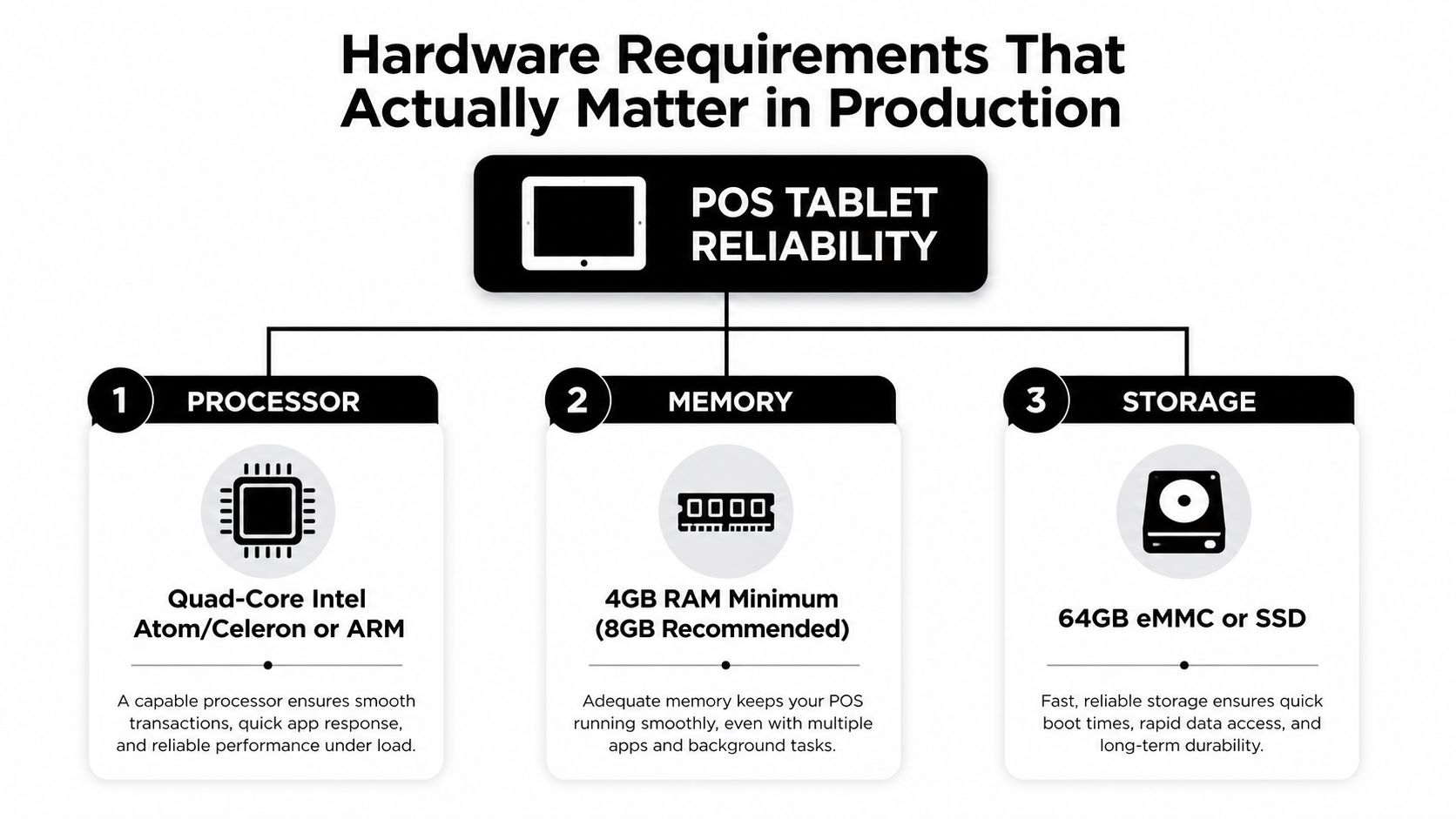
The specs that look exciting on a sales sheet rarely determine checkout reliability. In real deployments, the useful baseline is boring, conservative, and focused on consistency. Commercial tablet POS units commonly use quad-core Intel Atom, Intel Celeron, or ARM-based processors, with 4GB to 8GB RAM and 64GB to 128GB storage, and vendor documentation shows 10.1-inch to 15.6-inch screens at 1280 x 800 or 1920 x 1080 resolution CNET content PDF. On Windows, current guidance says 8 GB RAM is the minimum for modern POS apps, 16 GB is better for analytics dashboards or multiple browser tabs, and SSD storage should start at 128 GB, with 256 GB preferred for longer deployments POSzeo Windows tablet guide.
Compute matters less than consistency
A POS terminal doesn't need gaming-class compute. It needs predictable response under load, stable memory behavior, and local storage that doesn't stall when the app is writing receipts, cache files, or queued orders. That's why the engineering conversation should start with transaction consistency, not benchmark bragging rights. The buyer who compares CPU names but ignores storage type is usually the one who ends up troubleshooting random checkout lag six months later.
The screen is part of the reliability story, but not because customers care about pixels. A larger panel can help cashiers and servers avoid mis-taps, and higher resolution can make multi-pane UIs easier to read. Still, the critical line item is whether the device can stay usable in poor light, with gloves, or while workers are moving fast. For grocery, quick-service, and outdoor retail, glove-compatible capacitive touch support is a meaningful requirement, not a luxury POSzeo Windows tablet guide.
I/O density is the hidden differentiator
The part of the spec sheet most teams underweight is I/O. One industrial tablet POS platform exposes a 15.6-inch 1080 x 1920 panel with three USB-C 2.0 ports on each side, while another restaurant-oriented tablet POS bundles Wi‑Fi 6E, Bluetooth 5.3, LAN docking, 8GB LPDDR5, and 128GB UFS storage Pepperl+Fuchs product documentation. That density isn't about hardware vanity. It's about keeping printers, scanners, drawers, and secondary displays from fighting over the same bus.
Separate peripherals across USB, Ethernet, and dock paths whenever the hardware allows it. Shared traffic is one of the fastest ways to make a tablet feel unstable even when the app itself is fine.
Durability closes the loop. Current buying guidance treats IP65 as the baseline for food-service devices, IP67 for outdoor or high-moisture deployments, and MIL-STD-810H drop resistance from 1.2 meters onto concrete as a meaningful threshold Alibaba POS tablet guide. The same guidance recommends batteries rated for at least 10 hours of continuous screen-on time. That matters because battery promises collapse quickly when the tablet is also powering peripherals, brightness stays high all shift, and the charger gets bumped loose during service.
A rugged device rated IP65, spill-resistant, and drop-tested to 1.8 m reduces the most common failure triggers in busy lanes CNET content PDF. In production, that kind of resilience saves more money than an extra ounce of thinness ever will.
Choosing Between Android iPad and Windows POS Platforms
The operating system decides how painful the fleet will be to own. Android, iPad, and Windows can all work as POS system tablet platforms, but they behave very differently once you move past the pilot. The buying question isn't “Which one feels nicest?” It's “Which one can stay supportable, secure, and remotely manageable for three to five years without constant exceptions?”
Criteria | Android | iPad | Windows |
|---|---|---|---|
Security patch longevity | Depends heavily on vendor and model support | Usually more controlled across supported devices | Strong enterprise patching model, but device choice matters |
MDM enrollment compatibility | Needs pre-purchase validation, especially on budget devices | Generally predictable in controlled ecosystem | Usually strong in enterprise environments |
True single-app kiosk mode | Can be inconsistent across brands and services | More consistent, especially in managed deployments | Good for enterprise lockdown workflows |
Peripheral driver support | Wide device range, but fragmented | Reliable in approved accessory ecosystems | Broad support, especially for business hardware |
Fleet predictability | Lowest on mixed hardware | High, with less fragmentation | High, but requires careful device standardization |
Android gives flexibility, but demands discipline
Android is attractive because the hardware ecosystem is huge and the upfront options are broad. That same openness creates fragmentation. Budget devices can ship with limited Google services, uneven update commitments, and kiosk behavior that looks fine in a demo but breaks in real fleet management Alibaba Android POS tablet guide. If a team chooses Android, it should test MDM enrollment before purchase, validate accessory support on the exact model, and confirm that single-app kiosk mode is enforced, not just visually hidden.
For buyers comparing current consumer choices, top Android tablets this year can be a useful starting point, but retail and hospitality teams still need to think like operators, not shoppers. A tablet that looks great in a review video may still be a weak fleet device if it can't survive patching, remote lock-down, and peripheral churn.
iPad and Windows solve different control problems
iPad's advantage is ecosystem control. Hardware, OS, and app behavior are more tightly aligned, which usually reduces surprises for managed fleets. Windows takes a different path. It gives enterprise teams a familiar patching and device-control model, plus a wider fit for traditional business workflows, but it also needs stronger hardware discipline and more attention to memory and storage baselines POSzeo Windows tablet guide.
The best platform is the one your team can patch, lock down, and support without heroics.
The key distinction is supportability. A three-year deployment lives or dies on whether the device can stay in a certified hardware list, keep its kiosk policy intact, and remain compatible with the peripheral stack after updates. That's why platform choice is really fleet policy choice. The tablet is just the endpoint.
Integrating Payments Inventory and Analytics Back Ends
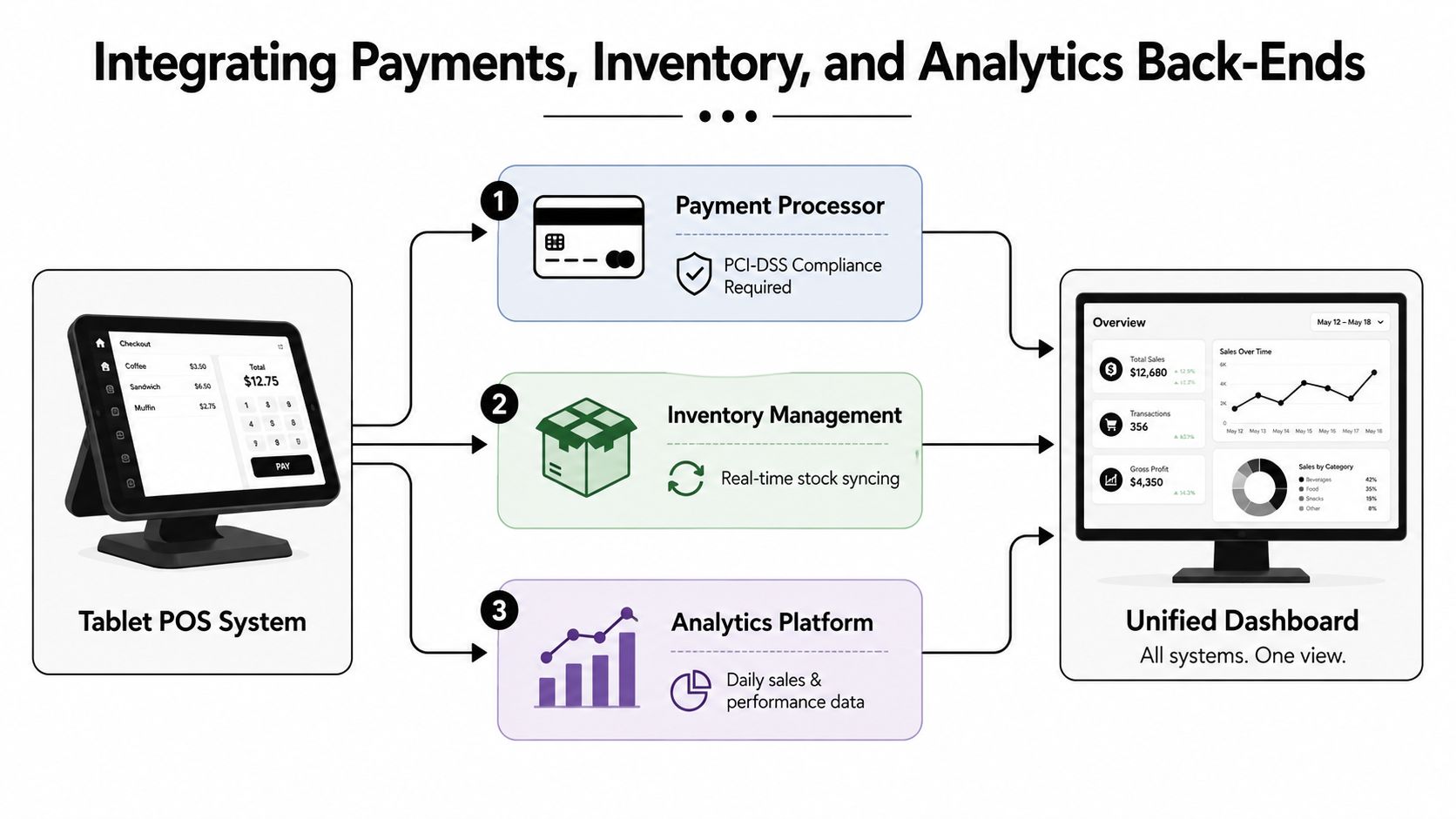
A tablet POS only becomes useful when it talks cleanly to the systems behind it. Payments, inventory, and analytics each have different failure modes, and teams often discover that the integration effort is larger than the hardware rollout itself. The POS software market's cloud push makes this unavoidable. DataIntelo reports cloud-based deployment at 62.3% market share in 2025, which means data sync, queueing, and conflict handling are now core operational concerns, not add-ons DataIntelo.
Payments need fewer handoffs, not more
For card-present transactions, the architecture should minimize exposure to sensitive data and reduce the number of systems that touch the payment flow. That usually means designing around tokenization and keeping the payment processor integration tightly scoped. Integrated payments are simpler for cashiers because the checkout app owns the full flow. Semi-integrated designs can reduce some risk by separating the card entry device from the POS app, but they also introduce more moving parts and more support points.
The engineering question is whether the device can keep processing safely when connectivity drops. If it can't, offline queuing and reconciliation need to be defined before launch, not after the first outage. That's where cloud-first systems earn their keep or reveal their weak points.
Inventory and analytics need clean data contracts
Inventory sync fails when product definitions drift. A barcode scanner can be perfect and the count can still be wrong if item mapping, modifiers, or location-level stock rules aren't consistent. The solution is not more manual cleanup. It's clearer data ownership between the POS and the inventory back end. That also matters for analytics, because daily sales dashboards only help if every register, lane, and location emits the same event structure.
For teams building a deeper analytics layer, analytics engineering practices for POS data are useful context. The point is simple. If the POS emits messy events, the reporting team ends up compensating forever.
Watch the integration surface area
APIs and webhooks sound easy until rate limits, retries, and partial failures show up. A custom integration may be fine for one location and one payment flow, then become brittle when you add a second store, a second tax rule set, or a new loyalty app. Middleware can reduce that burden, but it adds another vendor and another failure domain.
Build for retries, deduplication, and reconciliation from day one. If a webhook can arrive twice, your back end has to survive that without double-posting the sale.
The practical buy-vs-build decision is not about whether integrations exist. It's about whether your team has the engineering bandwidth to keep them healthy as the stack changes.
Calculating True Total Cost of Ownership
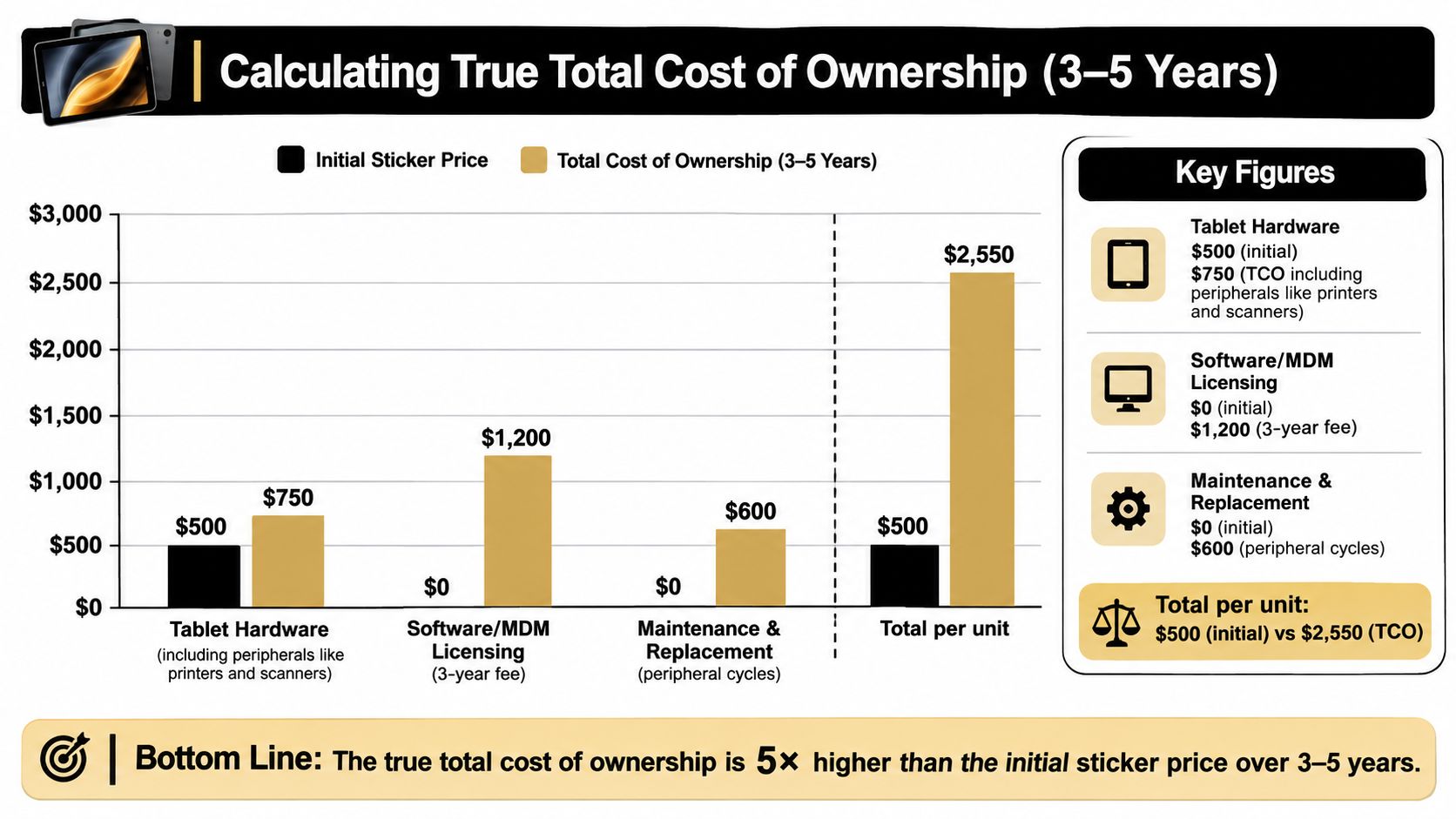
Sticker price is a trap. A tablet that looks affordable at purchase can become expensive once you add management software, replacement peripherals, downtime, and support labor. The number that matters is what one lane or one station costs over the deployment horizon, not what the base tablet costs on day one.
The obvious costs are the easiest to underestimate
MDM licensing gets overlooked constantly because it doesn't feel like hardware. Neither do software support contracts, enrollment time, or the labor required to patch devices on a schedule. Then come the peripherals. Printers, scanners, and cash drawers usually wear out faster than the tablet itself, especially in high-volume sites where the hardware gets touched all day.
Downtime is the cost finance teams care about most once it happens. A failed lane at lunch or dinner creates a line, and a line creates abandoned purchases, staff stress, and manager intervention. That's why a rugged unit with IP65 protection and 1.8 m drop resistance is often cheaper in practice than a fragile consumer tablet that needs more replacements and more babysitting Alibaba POS tablet guide, CNET content PDF.
Add supportability to the model
The hidden line item is engineering time. Someone has to handle OS updates, security patches, accessory testing, integration maintenance, and recovery workflow drills. If the fleet uses Android, someone also has to watch for vendor support changes and MDM compatibility drift. If it uses Windows, someone has to respect memory and storage baselines and keep accessory drivers aligned Alibaba Android POS tablet guide, POSzeo Windows tablet guide.
The most realistic TCO model includes at least four buckets:
Device and accessories: tablet, reader, printer, scanner, cash drawer, display.
Management and software: MDM, POS software, integrations, support.
Operations and recovery: testing, training, rollback planning, incident handling.
Refresh and replacement: batteries, cables, peripherals, and failed units.
A clean TCO model also forces the team to price offline resilience testing and failure recovery workflow development. Those are not optional extras. They're what keep the store open when the network or a peripheral fails.
Implementation Roadmap From Pilot to Fleet Deployment
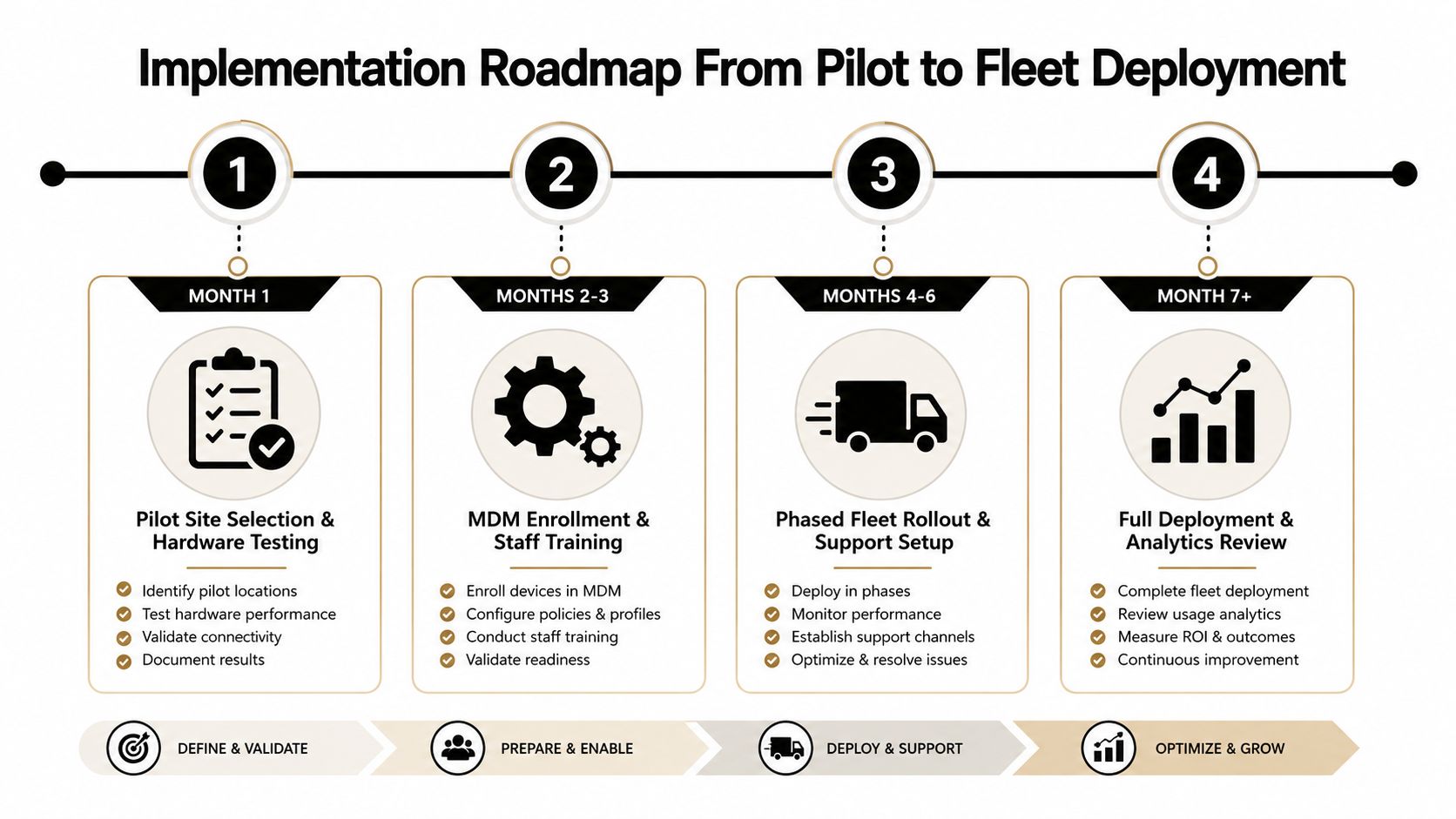
A pilot should prove failure handling, not just happy-path checkout. Most rollout plans miss that distinction and then promote a pilot site that only worked because everyone involved was paying close attention. A real deployment needs gates, rollback criteria, and a boring amount of validation before scale-up.
Phase 1 validate the device, not the demo
Start with one site that has the same peripheral mix, connectivity profile, and staff behavior you expect in production. Validate hardware compatibility, MDM enrollment, and offline recovery before anything gets mass-ordered. If the tablet cannot be locked down correctly or if the payment flow fails under local outage conditions, stop there.
Your go/no-go criteria should be simple:
Hardware checks passed: screen, battery, ports, and accessory compatibility.
MDM checks passed: enrollment, kiosk lock, remote wipe, and policy push.
Offline checks passed: queued transactions, reconciliation, and recovery.
Phase 2 prove the integration stack
Once the device is stable, certify the payment processor path and the peripheral path together. That means printer output, scanner behavior, drawer triggers, and receipt timing all have to work in the same workflow, not just in isolation. Staff training belongs here too, because failure recovery procedures are only useful if the person on shift can execute them.
The linked training and platform work around DevSecOps integration practices maps well to POS rollouts because the same discipline applies. You need controlled change, repeatable validation, and a rollback plan when a new release behaves badly.
Phase 3 roll out in waves
Do not flip every store at once unless the cost of failure is tiny. Stage the rollout, watch transaction success, peripheral latency, and support tickets, then use that signal to decide whether to continue. The monitoring dashboard should show both checkout performance and device health, because those are often the earliest signs that something is drifting.
Phase 4 manage the fleet like infrastructure
Quarterly patch cycles, refresh planning, and integration maintenance should be formal processes, not memory-based chores. The fleet gets more stable when someone owns certification lists, OS updates, and device retirement dates. That's the difference between a rollout and an infrastructure program.
Building the Engineering Team to Execute Your POS Strategy
Hardware doesn't fail alone. Deployments fail when no one on the team understands payment workflows, MDM policy, peripheral control, cloud sync, and incident handling well enough to keep the fleet stable. That skill mix is rare, and it's why a polished rollout plan still falls apart without the right engineers behind it.
The hiring problem is not just headcount. It's fit. You need people who can reason about device lockdown, integration edge cases, and supportability over time, not just ship a checkout screen. TekRecruiter's engineer-to-engineer recruiting model is built around that exact problem, using technical conversations to identify the top 1% of talent instead of relying on generic screening. Its service model includes Direct Hire, Staff Augmentation, On-Demand, and Managed Services, which map cleanly to different phases of a POS rollout TekRecruiter engineering recruiting.
For a pilot, staff augmentation can fill the gap fast. For a multi-location rollout, direct hire and managed services make more sense because the platform needs long-lived ownership. On-demand is useful when a deployment spike hits or a specialist is needed to resolve a stubborn integration issue. That flexibility matters because a POS fleet is never just a checkout project, it's a living system that needs people who can keep it patched, monitored, and recoverable.
If you're planning a tablet POS deployment and need engineers who understand the operational realities behind it, TekRecruiter can help you build the team that keeps the system reliable after launch. Visit TekRecruiter to connect with a recruiting partner that knows how to find elite engineering talent for POS, retail technology, and systems integration work.