Salesforce Engineering Explained: Roles, Skills, and Hiring
Learn what Salesforce engineering covers, from Apex and integrations to certifications and team structures, with practical guidance on hiring the right talent.
A CTO walks into a quarterly review expecting a routine Salesforce update and discovers that the platform now runs revenue operations, partner onboarding, and a custom claims workflow. Three vendors are editing metadata, nobody owns the org map, and an integration failure is being discussed as a business incident rather than a CRM issue.
That moment is where Salesforce engineering begins. Salesforce may have started as a CRM, but mature organizations use it as application infrastructure, an integration boundary, a data system, and part of their audit posture. The difficult work rarely happens in a clean greenfield org. It happens inside inherited environments where configuration, Apex, managed packages, integrations, and undocumented business rules have accumulated over years.
The Salesforce Engineering Moment Most CTOs Underestimate
Early-stage companies can often operate with an administrator and occasional developer support. The team knows the objects, the automations are visible, and the backlog is mostly configuration. That model breaks when Salesforce becomes connected to finance, fulfillment, customer service, partner systems, and executive reporting.
The change usually arrives slowly. An acquisition brings another org. A business unit adds a new cloud. A CPQ implementation creates new pricing and quoting logic. An ERP integration begins exchanging financial data. A warehouse starts depending on Salesforce records that were once treated as operational details. Each decision can be reasonable on its own, but together they create a system no single administrator can safely understand.
Practical rule: When Salesforce affects revenue, financial reporting, customer commitments, or regulated workflows, treat the org as production infrastructure.
Start with an inventory, not a hiring request. Identify every org, integration, managed package, metadata deployment path, data owner, and external vendor. Then map the critical business processes from user action to downstream system. A lead conversion, claim approval, or partner registration may cross Flow, Apex, an API gateway, an ERP, and a warehouse before the transaction is complete.
Next, assign technical ownership. One person doesn't need to perform every task, but someone must own the architecture, release governance, incident response, and technical debt register. Without that owner, each vendor optimizes its own ticket queue while the organization absorbs the risk at the seams.
The next staffing decision should reflect the actual system. If the biggest risk is a fragile integration, hire or augment for integration depth. If the org contains years of conflicting automation, prioritize brownfield investigation and release discipline. If the data model is unstable, an architect who can align business ownership, sharing, reporting, and external contracts is more valuable than another developer focused only on Apex.
The next 60 days can determine years of delivery quality once Salesforce becomes load-bearing infrastructure. Organizations that define ownership early can make deliberate changes. Organizations that postpone the decision usually pay through failed releases, duplicated logic, vendor dependency, and slow incident recovery. A useful example of the kind of Salesforce team structure leaders should examine is this Salesforce team case study.
How Salesforce Engineering Became a Platform Discipline
Salesforce's origin in 1999 placed it among the early SaaS companies delivering software over the internet rather than through on-premise installation. The important engineering shift came with AppExchange in 2005, which created a developer marketplace and expanded Salesforce from a CRM product into an application platform. The company later added Service Cloud and acquired Heroku by 2010, reinforcing the move toward broader platform and application development infrastructure. These milestones are documented in Salesforce's history of the company.
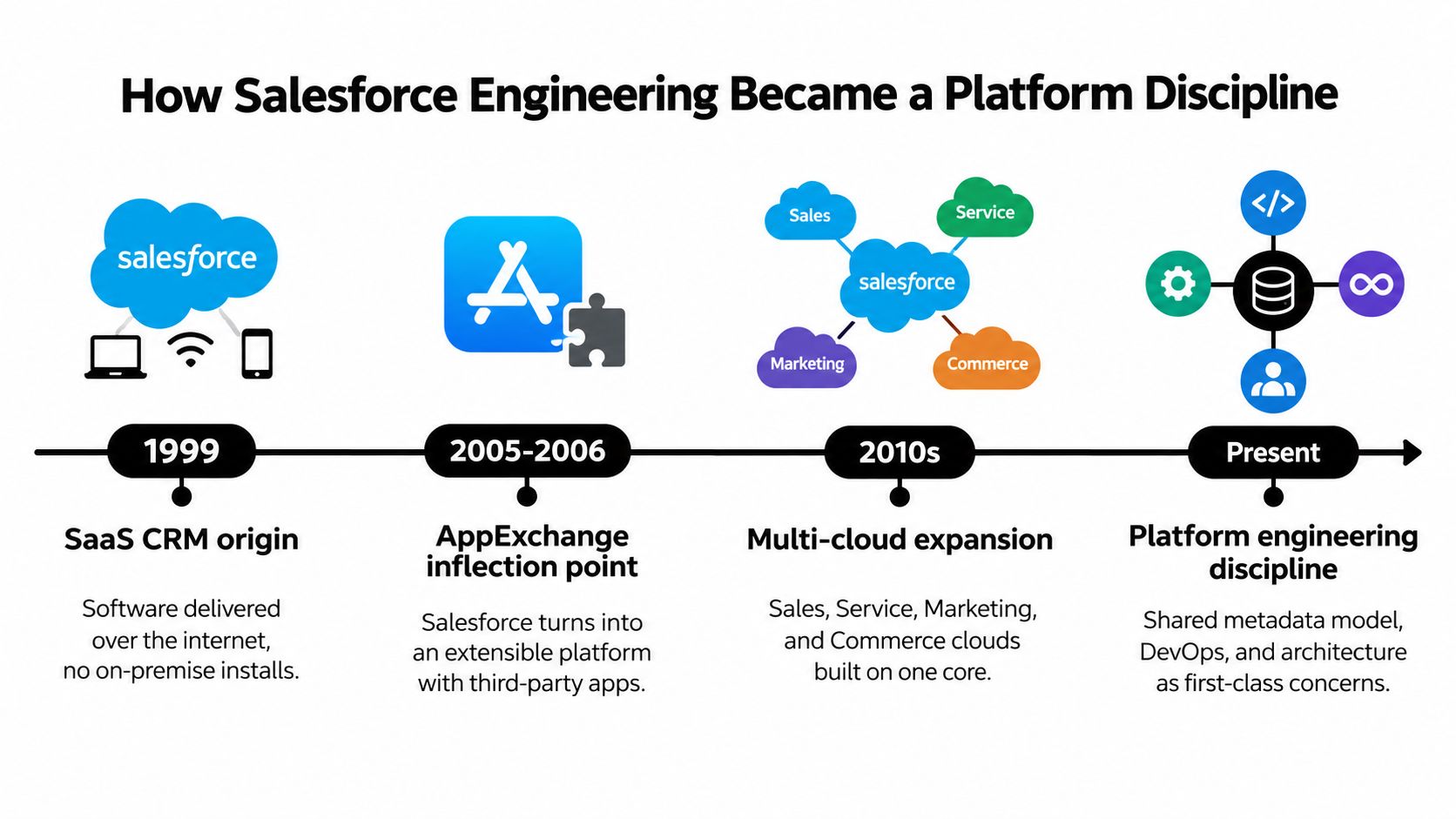
The engineering surface expanded as organizations adopted Sales Cloud, Service Cloud, Experience Cloud, Marketing Cloud, Commerce capabilities, and Industry Clouds. Each area introduces different objects, automation patterns, permission models, integration requirements, and release concerns. A team that understands only one cloud can still deliver useful features, but it may miss the dependencies created by the broader estate.
Salesforce engineering also developed a tooling layer that looks increasingly familiar to software teams. SFDX, scratch orgs, second-generation packaging, source control, automated testing, and DevOps Center support repeatable development and deployment practices. Those tools don't turn Salesforce into an unrestricted general-purpose runtime. They make it possible to manage a constrained, metadata-heavy platform with stronger engineering discipline.
The ecosystem scale explains why this discipline matters. A Salesforce-published analysis projected that the broader ecosystem could create 9.3 million new jobs and $1.6 trillion in new business revenue by 2026, while stating that 70% of implementations were led by 132,000 credentialed experts and that the developer community was a million strong. Those figures are presented in Salesforce's ecosystem analysis, and they signal a global technical labor market rather than a niche customization practice.
A Salesforce engineer therefore needs two mental models at once. The first is conventional software engineering, including version control, testing, observability, interfaces, and deployment safety. The second is platform engineering under multitenancy, where shared resources and metadata behavior impose boundaries that code alone can't override.
The modern role is not “the person who writes Apex tickets.” It is the engineer who can ship a reliable change across configuration, code, data, integrations, security, and release operations.
The platform discipline is also becoming more automation-heavy. Salesforce's internal engineering update describes agentic tools writing code, reviewing pull requests, generating tests, updating documentation, and coordinating deployments. The lesson for enterprise teams isn't to copy an internal workflow blindly. It's to recognize that engineering quality will increasingly depend on how well people define context, guardrails, verification, and ownership.
A short technical introduction to the platform's engineering career paths and capabilities is available through Salesforce engineering roles and technology.
The Four Core Functions Inside a Salesforce Engineering Team
A credible Salesforce engineering team covers four functions. Titles can vary, but the responsibilities can't disappear. When a team ignores one area, the missing work usually reappears as production risk somewhere else.
Apex engineering
Apex engineers build custom controllers, batch jobs, invocable actions, platform event handlers, and transaction logic that declarative tools can't safely express. They must design for bulk operations from the beginning. A trigger that works for one record but fails when an import updates a collection isn't production-ready.
The important distinction is that Apex doesn't run in isolation. Every line executes inside a shared, governor-limited runtime. Developers need to understand transaction boundaries, recursion, order of execution, asynchronous processing, and test behavior. They also need to know when not to write Apex. A simpler Flow or standard feature can be easier to govern than custom code, provided the resulting automation remains observable and maintainable.
Integration engineering
Integration engineers own the contracts between Salesforce and external systems. Their work includes REST and SOAP APIs, Platform Events, Change Data Capture, MuleSoft or another integration platform, and authentication through Named Credentials and connected apps.
The hard part isn't sending a request. It's defining ownership, retry behavior, idempotency, failure handling, monitoring, and reconciliation. A finance integration that drops updates without warning is more dangerous than one that fails loudly. The engineer must also understand API concurrency and timeout boundaries, which Salesforce documents in its platform API limits reference.
Data engineering inside Salesforce
Data engineers working on Salesforce handle large data volumes, ownership skew, archiving, selective access patterns, reporting behavior, and the boundary between Salesforce and the warehouse. They decide which data belongs in the operational platform, which data should be replicated, and which transformations belong downstream.
This function also protects the data model from accidental complexity. Poor ownership design can create sharing problems. Excessive historical data can make queries and operations harder to manage. A warehouse connection doesn't excuse weak source-system governance. It makes consistent definitions more important.
For a deeper view of how data-focused roles fit into modern technical organizations, this analytics engineering overview provides useful context.
Admin-config engineering
Mature administration is engineering work. Flow, approval processes, validation rules, profiles, permission sets, package management, and release governance all shape runtime behavior and user access.
The administrator-config engineer should document why an automation exists, who owns it, what it replaces, and how it is tested. A declarative change can be as disruptive as a code deployment, especially when multiple flows and managed packages act on the same object. Treating configuration as “nontechnical” is how hidden business logic accumulates.
| Function | Primary Responsibilities | Key Platform Constraints |
|---|---|---|
| Apex engineering | Custom logic, triggers, batch jobs, invocable actions, and platform event handlers | Governor limits, transaction boundaries, bulk processing, and testability |
| Integration engineering | APIs, events, CDC, middleware, authentication, retries, and reconciliation | API concurrency, timeouts, authentication, and contract ownership |
| Data engineering | Data model, large data volumes, archiving, sharing behavior, and warehouse boundaries | Query selectivity, ownership design, data retention, and operational scale |
| Admin-config engineering | Flow, approvals, validation, permissions, packages, and release hygiene | Order of execution, metadata dependencies, access control, and change visibility |
The seams deserve the most attention. Apex can create an integration problem. A Flow can invalidate an assumption in a data pipeline. A permission change can break a deployment. Staff the team around those interactions, not around isolated job titles.
Governor Limits and the Architecture Decisions They Force
Salesforce's multitenant design means a transaction can't consume unlimited shared compute. Governor limits aren't an inconvenience added after architecture. They are part of the architecture.
For synchronous Apex, Salesforce documents ceilings of 100 SOQL queries, 150 DML statements, 6 MB of heap, and 10,000 milliseconds of CPU time per transaction. Asynchronous Apex increases several of those ceilings to 200 SOQL queries, 12 MB of heap, and 60,000 milliseconds of CPU time. The platform's reliability guidance recommends designing below the ceiling, with a target of about 70% of governor limits to preserve headroom for unexpected branching and load. These figures and recommendations appear in Salesforce's reliability architecture guidance.
| Governor Limit | Per-Transaction Ceiling | Forced Architecture Pattern |
|---|---|---|
| SOQL queries, synchronous Apex | 100 | Query once, use collections, and avoid queries inside loops |
| SOQL queries, asynchronous Apex | 200 | Move suitable high-volume work to asynchronous execution |
| DML statements | 150 | Collect changes and perform bulk DML outside loops |
| Apex heap, synchronous execution | 6 MB | Reduce in-memory payloads and process data in controlled batches |
| Apex CPU time, synchronous execution | 10,000 ms | Simplify branching, reduce repeated work, and shift expensive logic out of the request path |
| Apex CPU time, asynchronous execution | 60,000 ms | Use asynchronous processing for work that doesn't belong in a user transaction |
Consider lead routing during a bulk import. A single-record trigger can appear correct in a unit test, then issue a query for every record and perform repeated updates when many records arrive together. The correct design queries the relevant users and routing rules once, builds collections in memory, and performs consolidated DML.
Salesforce's coding guidance specifically recommends avoiding DML inside loops, querying once, processing collections, and using bulk trigger patterns. It also warns that a synchronous request running beyond 5 seconds counts toward the concurrent long-running request limit, with each org allowed 10 such concurrent requests. That means inefficient Apex can create contention before the transaction reaches a hard failure. The operational guidance is detailed in Salesforce's Apex coding conventions.
The most underestimated limit is CPU time. A test with a small data set may pass while real automation invokes flows, managed package logic, sharing calculations, and recursive handlers. Engineers should profile the entire transaction, not just the custom class under review.
Use synchronous work for decisions the user needs immediately. Use Queueable Apex, Batch Apex, platform events, or an integration layer when the work can be separated from the request. The right question isn't “Can this code run?” It is “What happens when this transaction runs with every automation and dependency active?”
Certifications, Credentials, and What They Actually Signal
Certifications are useful filters, but they're weak evidence of delivery by themselves. A multiple-choice exam measures recognition of platform concepts. It doesn't prove that a candidate has owned a production org, recovered from a failed deployment, or untangled automation nobody documented.
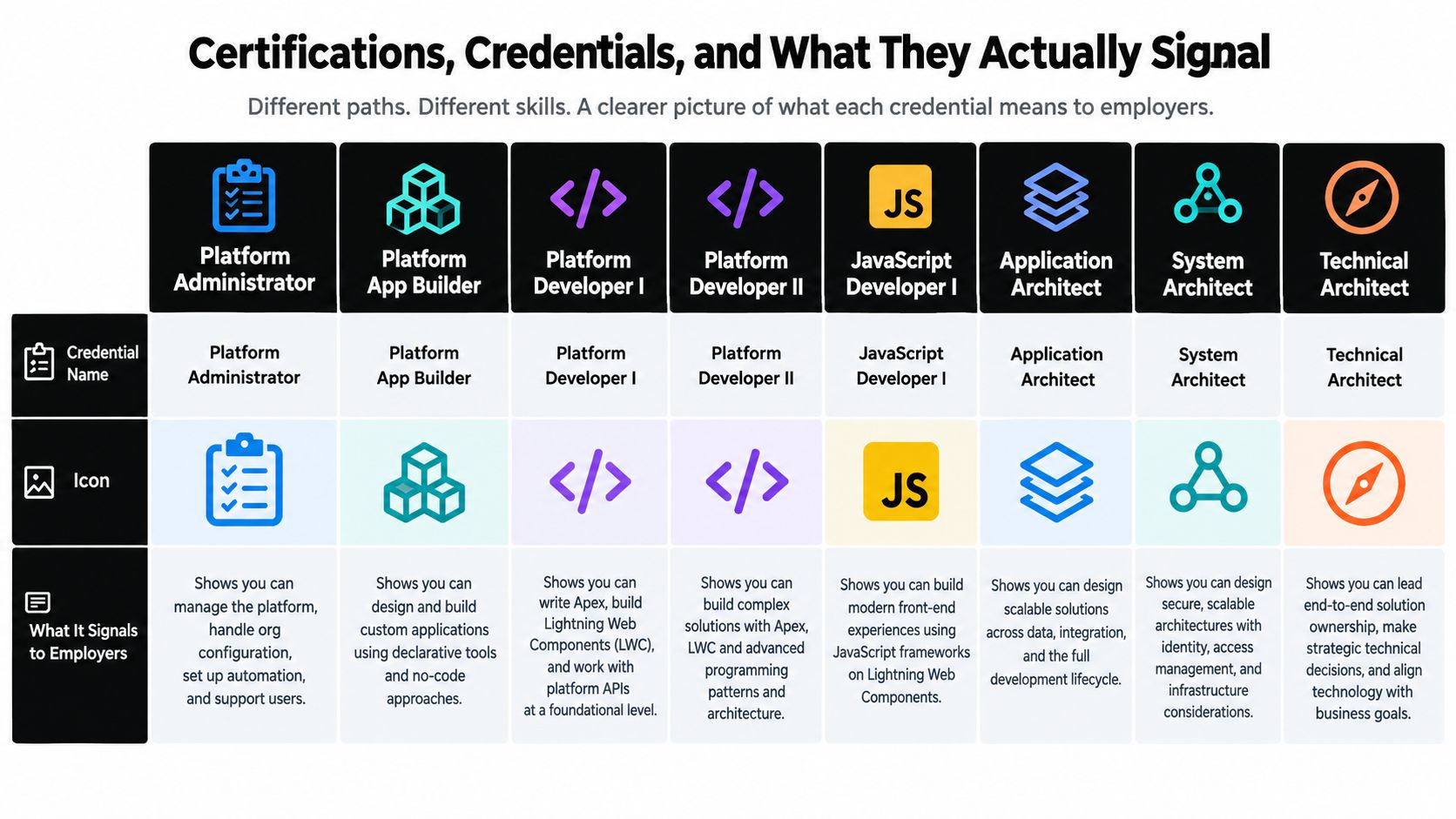
Salesforce's certification program separates tracks for Administrators, Architects, Consultants, Data Analysts, Developers, Designers, Marketers, and Sales professionals, as described in its certification structure. Read credentials as signals of intended scope, then test whether the candidate has applied that knowledge under real constraints.
- Platform Administrator: Signals comfort with org configuration, automation, users, and permissions. It doesn't establish that the candidate can design a safe integration or govern a complex release pipeline.
- Platform App Builder: Signals declarative application design. It doesn't prove programmatic depth or experience diagnosing interactions between Flow, Apex, and managed packages.
- Platform Developer I: Signals foundational programmatic knowledge, including Apex and platform development concepts. Ask for examples of bulkification, testing strategy, and production ownership.
- Platform Developer II: Signals more advanced development breadth. It still doesn't replace evidence of architecture judgment or incident leadership.
- JavaScript Developer I: Signals front-end capability relevant to Lightning Web Components. It doesn't demonstrate mastery of Salesforce data architecture, sharing, or integration contracts.
- Application Architect: Signals breadth across data, development lifecycle, and native Salesforce design. Salesforce states that this credential requires four prerequisite certifications, so it reflects a structured progression, not merely a single exam.
- System Architect: Signals attention to security, identity, infrastructure, and cross-system design. The credential is meaningful only when the candidate can explain trade-offs in the context of your estate.
- Technical Architect: Signals end-to-end solution ownership and broad knowledge across development platforms. Salesforce's guidance describes the role as assessing requirements and designing secure, high-performance solutions, which is substantially broader than writing platform code.
- AI Associate and AI Specialist: Signal familiarity with Salesforce's AI-oriented capabilities. Ask how the candidate handles data grounding, permissions, testing, and human accountability rather than accepting the credential as proof of responsible AI delivery.
Interview evidence should outrank certificate count. Ask candidates to describe an inherited org they changed safely, a migration they planned, an integration incident they investigated, and a release they stopped because the controls weren't sufficient. Require them to explain what they measured, what they documented, and what they would do differently.
The strongest signal is not platform purity. It is the ability to connect configuration, code, data, integrations, security, and change management while remaining accountable for the result.
Org Structures That Actually Ship Salesforce Work
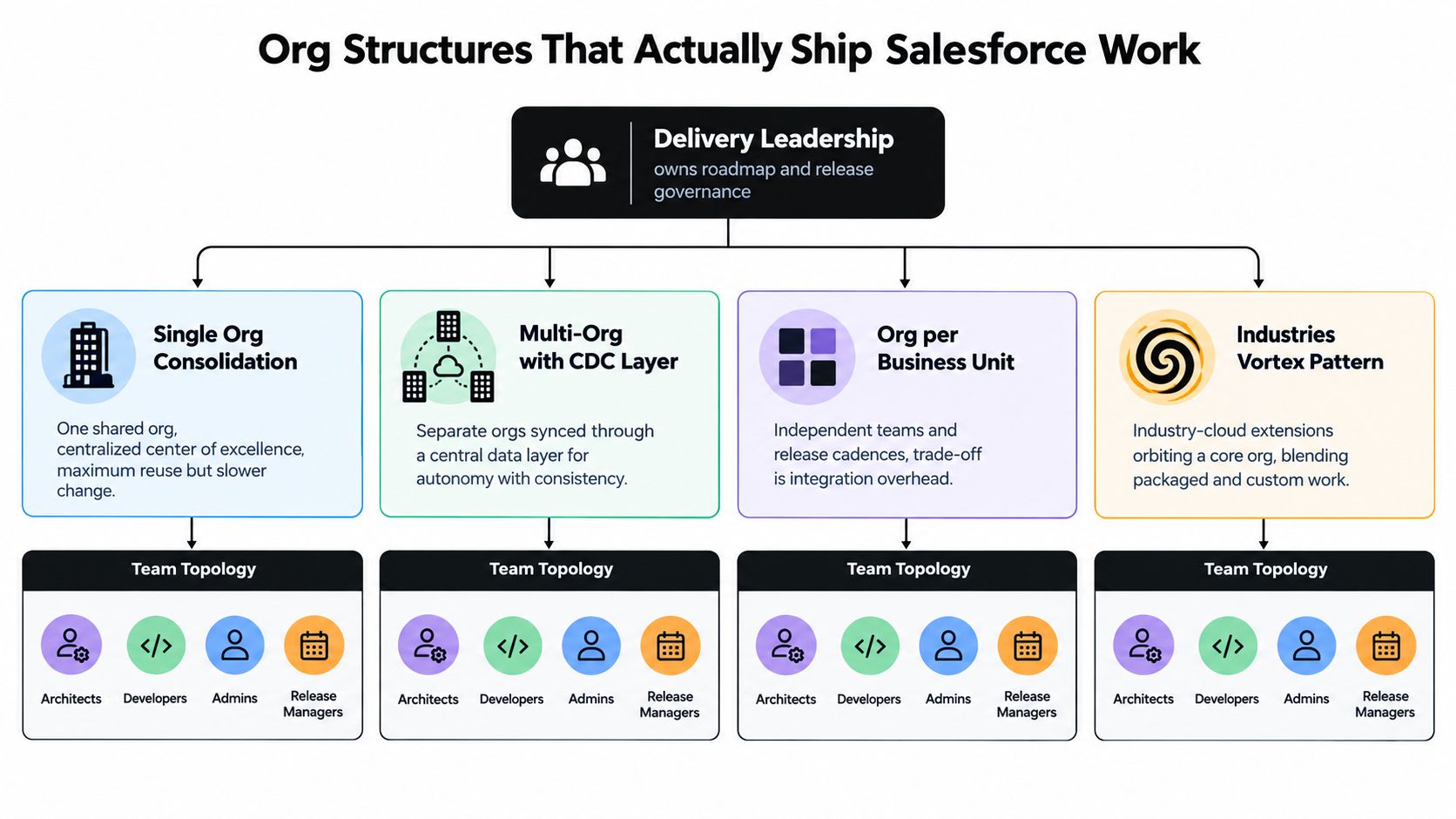
The org topology should determine the team topology. A single consolidated org can create reuse and a common data model, but it also concentrates dependencies and governance. Separate orgs can give business units autonomy, but they increase integration and release coordination.
Four patterns appear often:
- Single-org consolidation: Use a centralized center of excellence with an architect, platform owner, developers, administrators, and release governance. This works when the organization values shared processes and can manage competing priorities through one roadmap.
- Multi-org with a CDC layer: Keep local autonomy while using Change Data Capture and a central data layer to coordinate information. The team needs integration ownership, event governance, and clear rules about which org is authoritative for each domain.
- Org per business unit: Give each unit its own delivery cadence and local ownership. This can suit independent operating models, but the organization must fund the integration overhead rather than pretending the orgs are isolated.
- Industries Vortex pattern: Treat industry-cloud extensions as a set of packaged and custom capabilities around a core org. The architect must understand package behavior, data model extensions, and the boundary between standard functionality and bespoke logic.
A small, stable, single-cloud environment may only need one platform owner supported by an administrator and part-time development capacity. The warning sign is not headcount. It's whether that person can keep up with releases, security, integration support, documentation, and the backlog without creating a single point of failure.
Once several clouds, business units, or critical integrations are involved, use a pod. A practical pod includes a technical lead, developers, an integration engineer, a dedicated administrator-config engineer, and QA or release ownership. The architect should own the data model, governance, nonfunctional requirements, and release pipeline. Developers should own feature delivery within those boundaries.
Nearshore and offshore teams can handle a steady, well-documented backlog when ownership and handoffs are explicit. Use an on-demand senior architect for mergers, divestitures, major re-platforming, or an org strategy that has outgrown internal expertise. Don't ask a delivery team to improvise enterprise architecture while also carrying routine tickets.
Where AI Changes Salesforce Engineering and Where It Does Not
The useful question isn't whether AI replaces Salesforce developers. It's which Salesforce engineering profiles become more valuable when agents handle more execution.
AI accelerates greenfield production
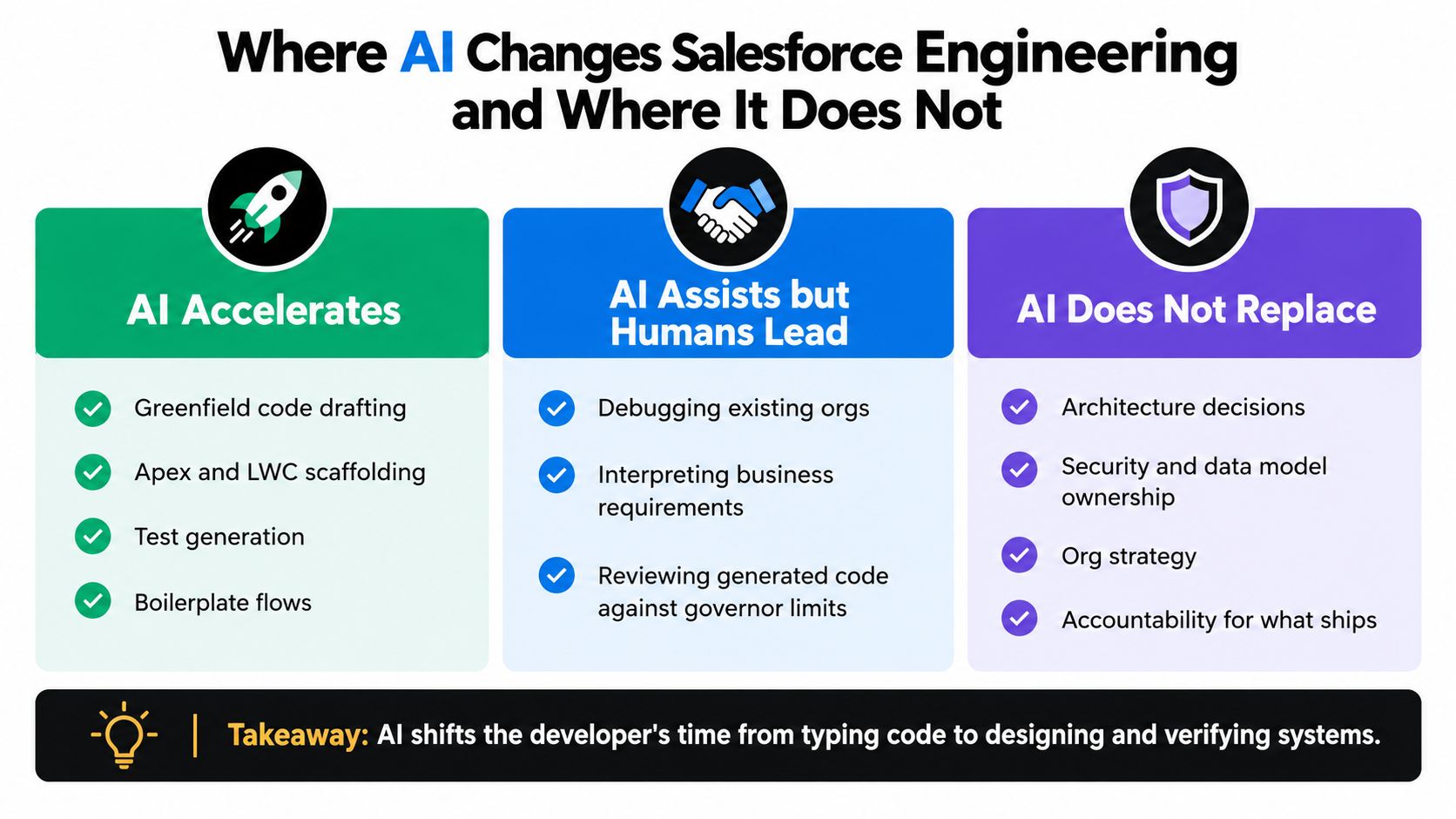
Agents can draft Apex and Lightning Web Component scaffolding, generate test starting points, suggest SOQL improvements, and produce repetitive Flow configuration. In a clean org with clear naming conventions and strong examples, this reduces the time engineers spend typing boilerplate.
That benefit is real, but it shifts the bottleneck. Someone still has to define the acceptance criteria, review permissions, test bulk behavior, validate integrations, and decide whether the generated solution belongs in the platform at all.
AI assists with brownfield analysis
AI can flag unused fields, suspicious patterns, potential governor-limit risks, and duplicated logic. It can help summarize metadata and propose refactoring candidates.
It can't reliably infer every business dependency in an inherited org. A rule may be duplicated in Flow, Apex, a managed package, an external integration, and a manual operating procedure. The engineer must trace lineage, interview owners, create a safe change sequence, and verify behavior in representative environments.
Humans still own architecture and change
An agent can't negotiate ERP scope with finance, defend a data model to a CFO, or take accountability for a CPQ rollout that changes revenue operations. Those tasks require authority, context, and judgment across organizational boundaries.
Salesforce's developer guidance describes most Salesforce development as brownfield engineering and argues that AI can't work through that context alone. Salesforce also reports that its agentic development model increased work items completed per developer by 50.8% year over year, PRs merged per developer by 79%, and Effective Output by 151.3%, while internal agentic workflow adoption crossed 90%. Those figures come from Salesforce's engineering update on its agentic model.
The defensible profile is the engineer who uses agents fluently but can also design verification, maintain observability, and make safe changes in a fragmented org. Hire for system ownership, not just prompt fluency or code volume.
Hiring and Augmenting a Salesforce Engineering Team
Staffing should follow risk and roadmap velocity, not a fashionable title list. A single-cloud org with stable demand can often use a platform owner plus contract integration support. A multi-cloud estate with regulatory exposure needs a pod that includes a lead engineer, an integration specialist, and an admin-config engineer responsible for declarative hygiene.
Use three hiring levers deliberately:
- Direct hire: Choose this for the platform owner who will own the multi-year roadmap, architectural standards, stakeholder relationships, and operating model.
- Staff augmentation: Add experienced specialists for a CPQ, MuleSoft, data, migration, or integration rollout when the need is substantial but not permanent.
- On-demand consulting: Bring in senior architecture capacity for an org strategy review, technical debt audit, merger, divestiture, or high-risk release.
Candidates don't need identical backgrounds. A developer with strong integration and data experience may outperform a platform-pure candidate who has only delivered isolated features. For people evaluating alternative entry routes, a practical no-degree Salesforce career resource can broaden the talent pool, provided interviews still test real delivery ability.
| Org Profile | Recommended Lever | Rationale |
|---|---|---|
| Single cloud with a stable backlog | Direct platform owner plus targeted contract support | Keeps ownership close while adding specialist capacity only when needed |
| Multi-cloud estate with complex dependencies | Permanent pod | Covers architecture, integration, development, configuration, testing, and release governance |
| CPQ, MuleSoft, or Data Cloud rollout | Staff augmentation | Adds focused implementation depth without permanently reshaping the core team |
| Merger, divestiture, or re-platforming | On-demand architect and delivery specialists | Provides senior judgment for a time-bound, high-risk change |
| Inherited org with undocumented automation | Brownfield assessment followed by selective hiring | Establishes context before committing to a team design |
Salesforce staff augmentation services can fit the middle lever when a team needs vetted Salesforce capability around a defined delivery period. The hiring decision should still begin with an org map, a dependency assessment, and a clear owner for what ships.
 Ron SmithPresident & Lead RecruiterTekRecruiter